Developer Guide
- Architecture
- Design and Implementation
- Product Scope
- User Stories
- Non-Functional Requirements
- Instructions for manual testing
Warning
Please do not touch the save files (in the ListFolder folder) that save the
user’s application usage history. This will interfere with the function of the program.
Architecture
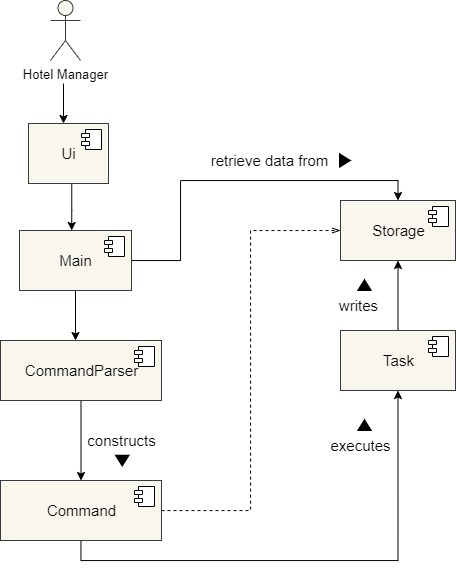
The Architecture Diagram given above explains the high-level design of the App.
Given below is the quick overview of the main components and how they interact with each other.
Main components of the architecture
Main is responsible for,
- When the app launches: It retrieves the contents of the various lists from their respective files.
- When the user inputs a command: It receives the user input from the UI and passes it to the command parser component to identify and parse the command.
- When the app shuts downs: It closes down the various components.
Besides Main, the application also consists of four components which are:
UI: The UI of the App.Command Parser: Deals with identifying the various commands from the user input and parsing the user input.Command: Executes the various commands inputted by the user.Storage: Reads data from, and writes data to, the hard disk.Tasks: Represents the various commands which would be executed by the command component.
Design & implementation
Assign a housekeeper to a room
The assignment of housekeeper to a room is facilitated by AssignHousekeeperCommand. This command objects uses AssignmentMap, which keeps a HashMap, to help us map a Room object to a Housekeeper object.
Map<Room, Housekeeper> map = new HashMap<>();
The following steps exhibit how AssignHousekeeperCommand
and AssignmentMap fit together in the structure and how the mechanism for adding an assingment behaves at each step.
Step 1. The user launches the application. In the Duke class, an empty instance of the AssignmentMap class,
called assignmentMap, is created.
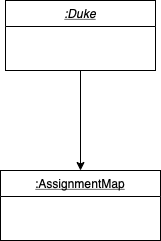
Step 2. The user types the command Assign susan / 301. In the Duke class, a Command object
is created by invoking the CommandParser class’s constructor on the user input. The details of this
step are further described below.
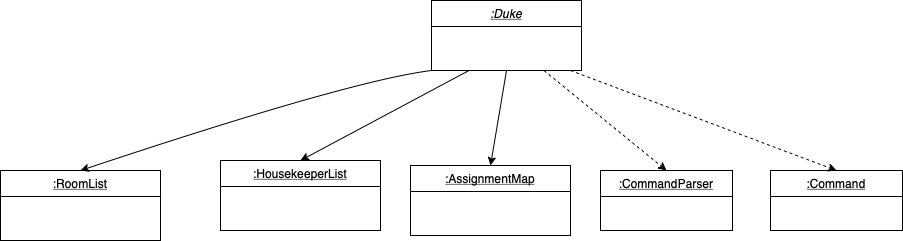
Step 3. The CommandParser class replaces the assign susan / 301 in the user input with an empty string,
leaving just susan / 301. Then, an instance of AssignHousekeeperCommand is created which extends the class Command.
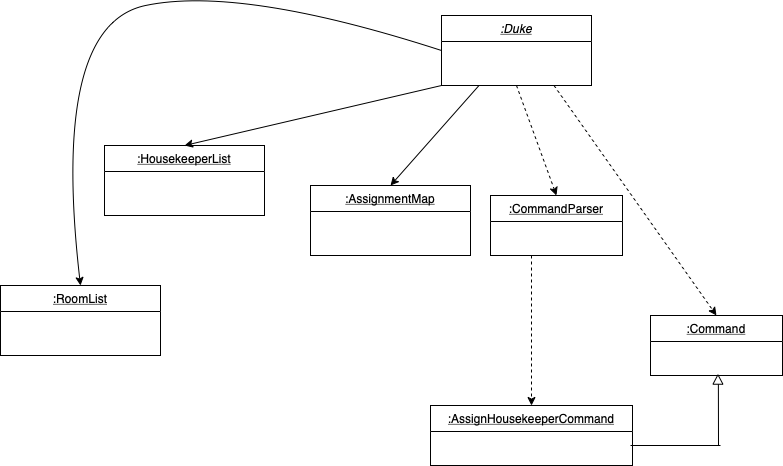
Step 4. The assignHousekeeperCommand object parses the name of the housekeeper and the ID of the room and send both to the the assignmentMap.
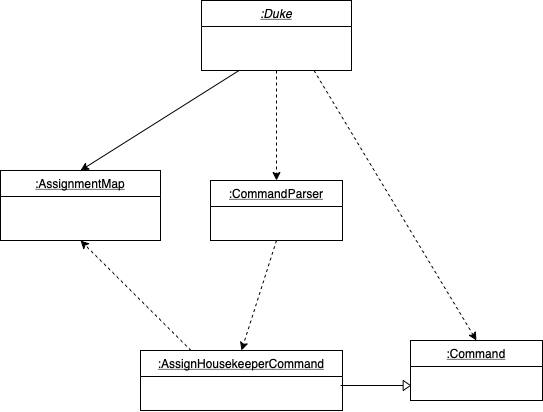
Step 5. The assignmentMap looks for the appropriate Room object for 301 in the RoomList and then looks for the appropriate Housekeeper object for Susan. It then adds both to the hashmap contained inside itself.
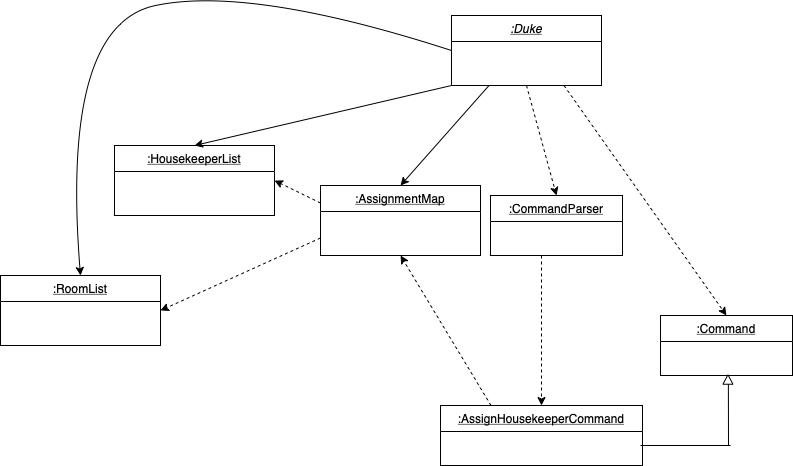
Interaction To understand the interaction between objects of these classes in order to actually add an entry into the hash map inside an AssignmentMap, refer to the sequence diagram below.
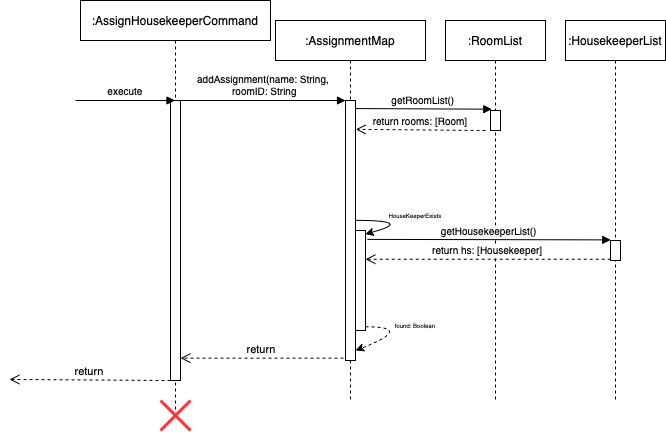
The command object passes on the ID of the room and the name of the housekeeper to the AssignmentMap object after parsing the input appropriately. The addAssignment function first locates the appropriate Room object from RoomList, and then looks for the Housekeeper object in the HousekeeperList and finally adds the mapping to the hash map.
Adding a customer’s satisfaction rating
The mechanism for adding a customer satisfaction (represented by the Satisfaction class) is facilitated
by AddSatisfactionCommand. The constructor parses user input to create a Satisfaction object (which contains
attributes storing the customer’s name and their satisfaction rating, represented as an integer from 1 to 5).
AddSatisfactionCommand extends Command and contains an override of the Command class’s execute method.
This execute method adds the Satisfaction object created from parsing user command into satisfactionList, the
object of type SatisfactionList that stores the Satisfaction objects. This SatisfactionList is
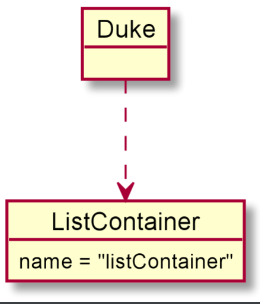
stored in a ListContainer object (the object that stores references to all of the data structures
that the application uses). Additionally, it implements the following operations:
AddSatisfactionCommand#extractCustomerName(String userInput): Extracts the customer’s name (a string) from the provided string of user input.AddSatisfactionCommand#extractSatisfactionValue(String userInput): Extracts the customer’s satisfaction rating (an integer from 1 to 5) from the provided string of user input.AddSatisfactionCommand#getSatisfaction(): Grabs the value of thesatisfactioninstance variable.AddSatisfactionCommand#setSatisfaction(Satisfaction satisfaction): Sets thesatisfactioninstance variable to the providedSatisfactionobject.
Given below is an example usage scenario and how the mechanism for adding a satisfaction behaves at each step.
Step 1. The user launches the application. In the Duke class, a ListContainer object is instantiated.
Step 2. The user types the command add satisfaction bob 5. In the Duke class, a Command object
is created by invoking the CommandParser class’s constructor on the user input. The details of this
step are further described below.
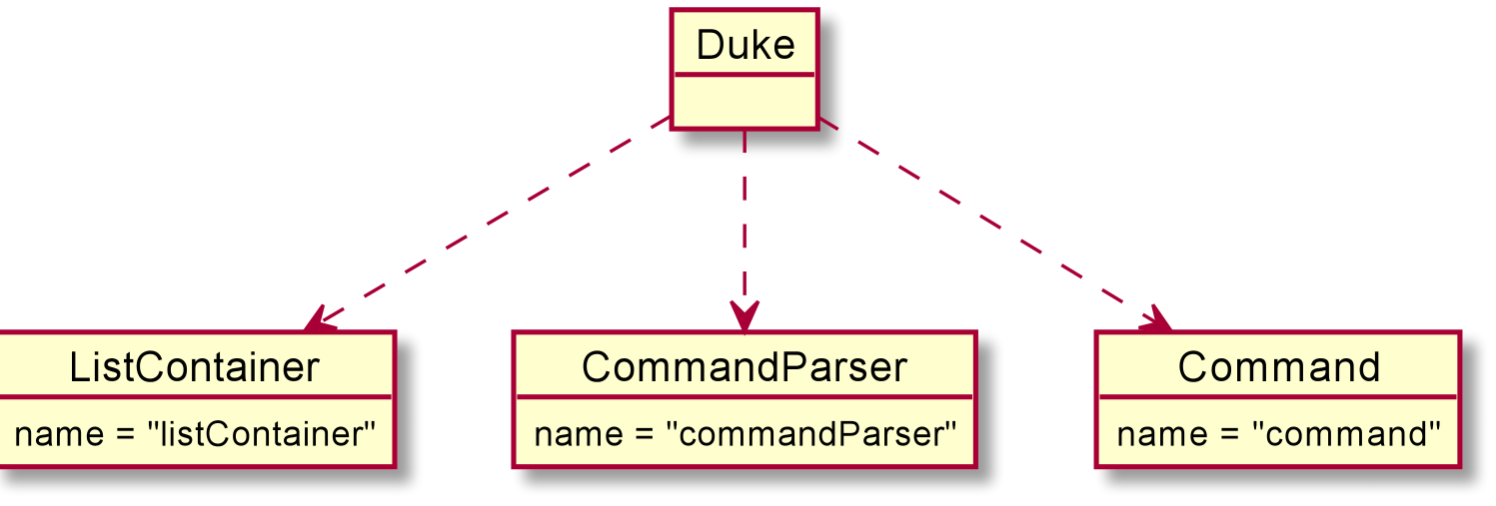
Step 3. The CommandParser class replaces the add satisfaction in the user input with an empty string,
leaving just bob 5. Then, the AddSatisfactionCommand class’s constructor is invoked with bob 5.
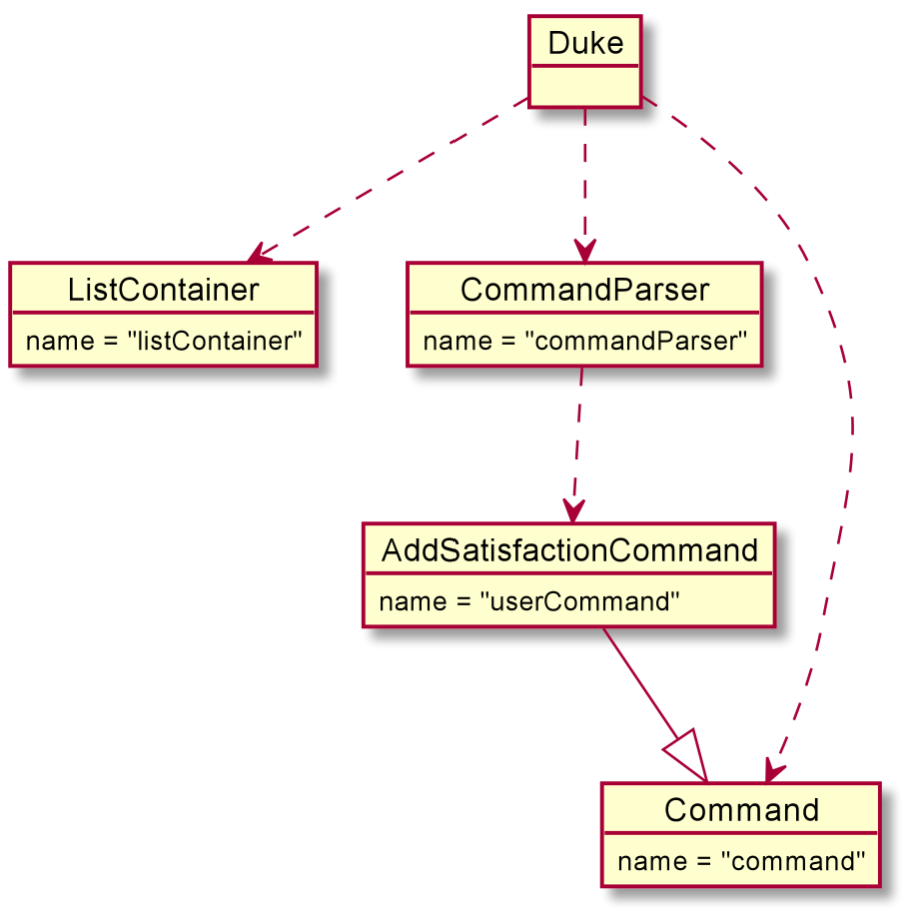
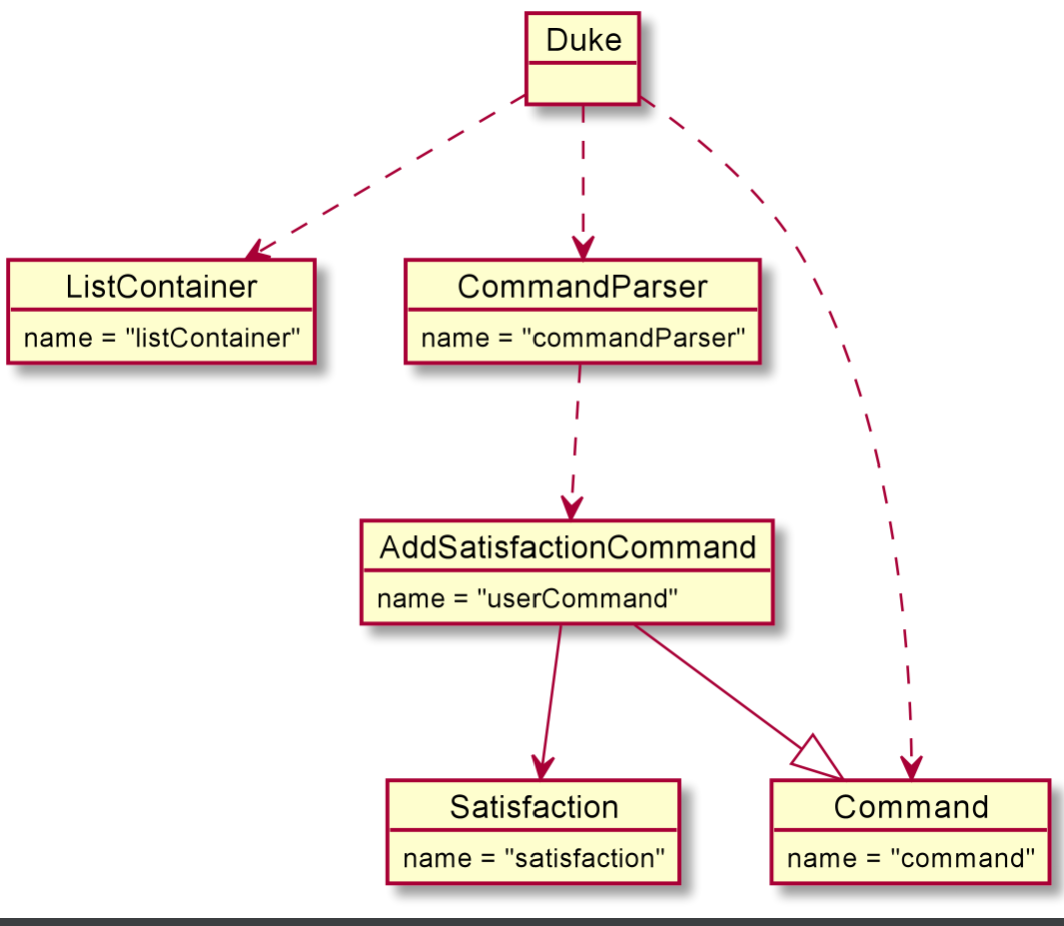
Step 4. The AddSatisfactionCommand class’s constructor parses bob 5, extracting the customer name Bob using the
AddSatisfactionCommand#extractCustomerName(String userInput) method and extracting the customer satisfaction rating
5using the AddSatisfactionCommand#extractSatisfactionValue(String userInput) method. The AddSatisfactionCommand
class constructor then invokes the Satisfaction class’s constructor to create a new Satisfaction object, passing in
customer name bob and satisfaction rating 5.
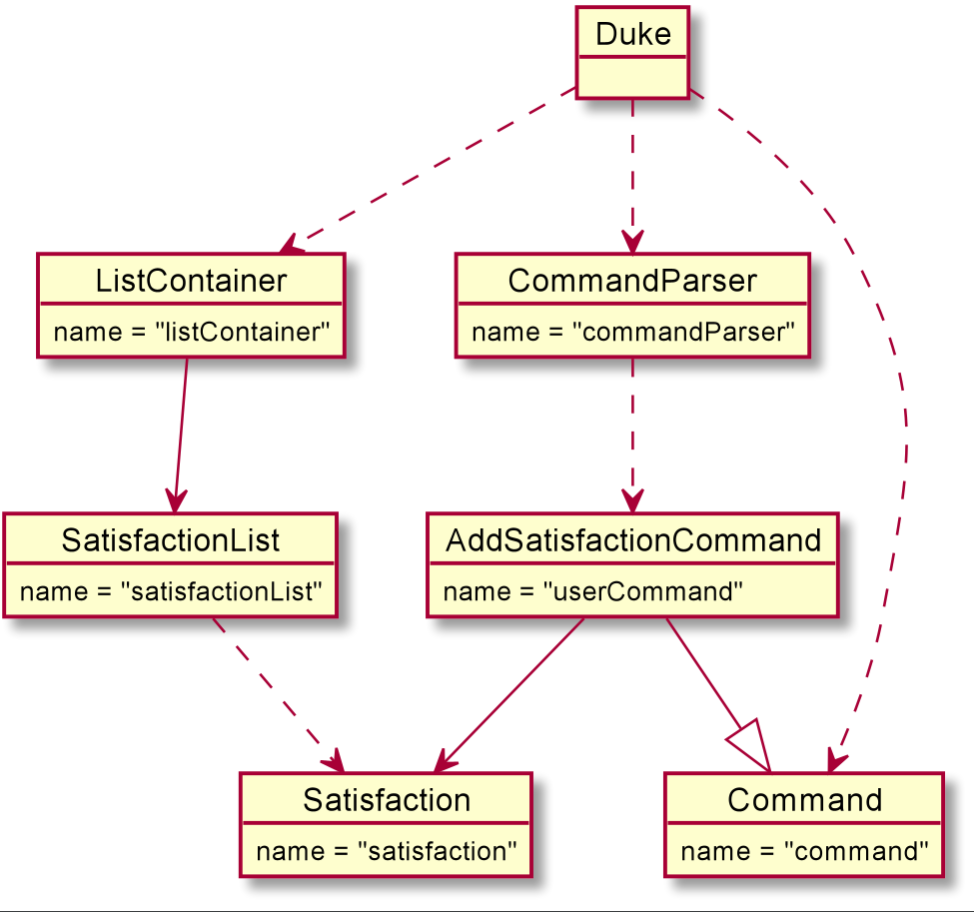
Step 5. When the AddSatisfactionCommand object is executed in the Duke class, the satisfactionList object is
obtained from the ListContainer object. Then, the satisfaction is added to the satisfactionList.
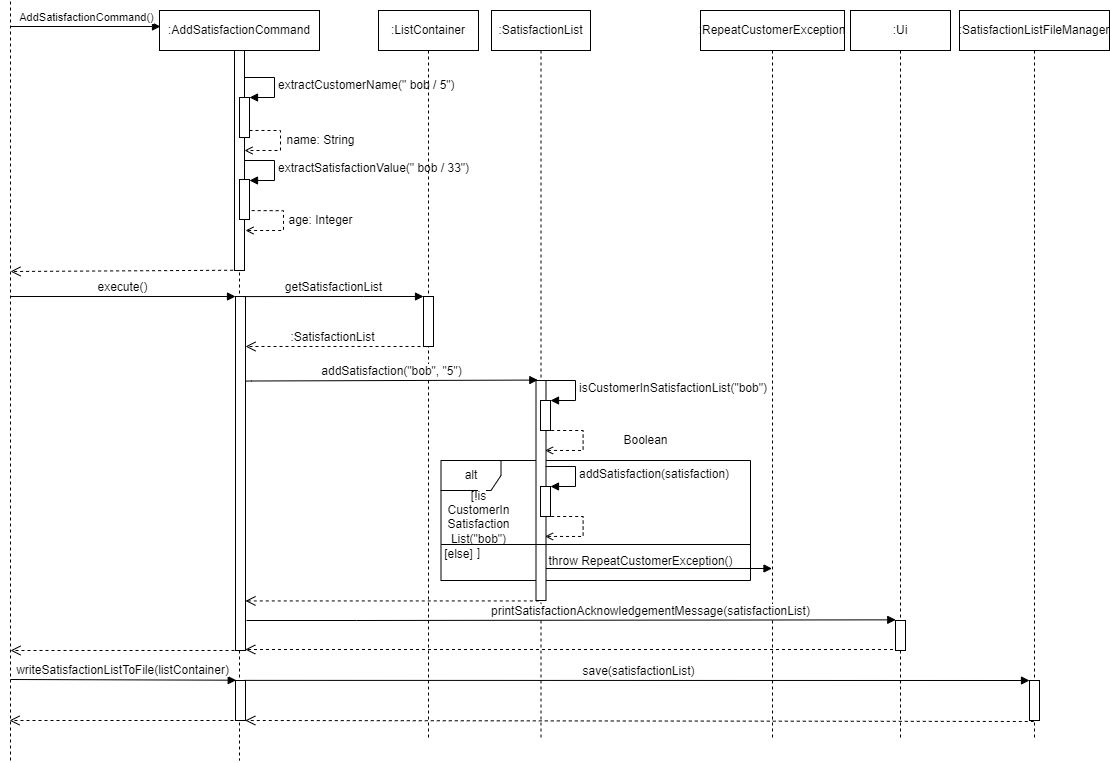
The following sequence diagram shows what would happen if the user typed add satisfaction bob 5.
PLEASE NOTE: This sequence diagram omits the details of some behavior and classes involved, like the Duke and
CommandParser classes.
Add Housekeeper feature
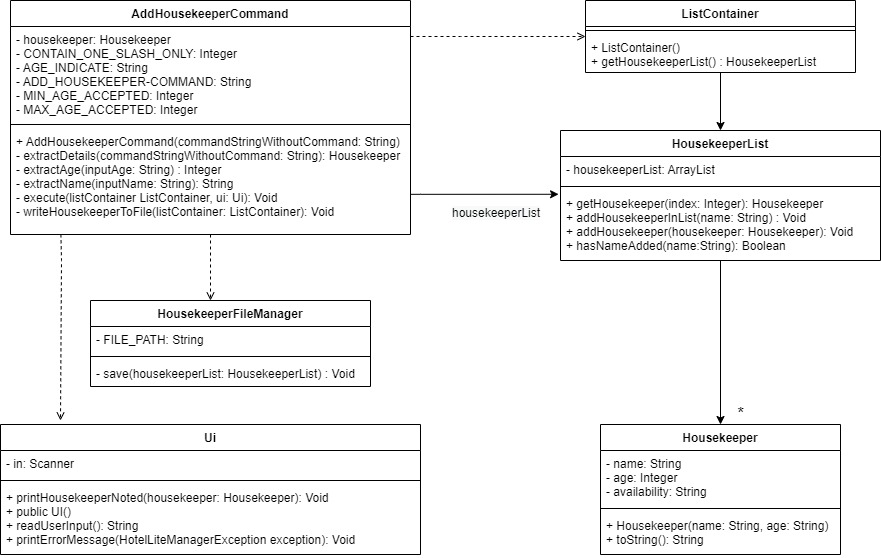
Add Housekeeper Class Diagram
The objective of the AddHousekeeperCommand is to take in user input and spilt it into two parts which is the name and
age of a Housekeeper. These details make up parts of the Housekeeper profile. With the name and age derived,
this information will be added into a new Housekeeper object, which will be recorded into the list of
housekeeper. The class diagram below depicts how the AddHousekeeperCommand interacts with other classes.
PLEASE NOTE: This class diagram omits the details of some classes involved, like the Duke, CommandParser and Command class.
It also omits some unused methods.
Below is an example showing the usage of AddHousekeeperCommand.
Step 1: Command given from the user: add housekeeper susan / 33. This command meant to add a new housekeeper called susan who is 33 years old.
Step 2: The parse method from CommandParser will run parse to create AddHousekeeperCommand and would be return to Duke.
Step 3: The execute method in AddHousekeeperCommand will be performed. It would get the housekeeperList from ListContainer.
Step 4: The addHousekeeperInList method from HousekeeperList would be called to check if the housekeeper has been recorded.
name of the housekeeper to be added has been recorded into the list.
Step 5: addHousekeeperInList will verify if housekeeper name is in the list by calling hasNameAdded and stores the
result in boolean.
If it has not been recorded, housekeeperList would then add this new user into the records by calling addHousekeeper
method.
Step 6: printHousekeeperNoted will be called to print a confirmation to show that the housekeeper
has been entered into the list.
Step 7. Housekeeper file storing all profile will be updated by calling writeHousekeeperToFile method.
This method will then call method save from HousekeeperFileManager.
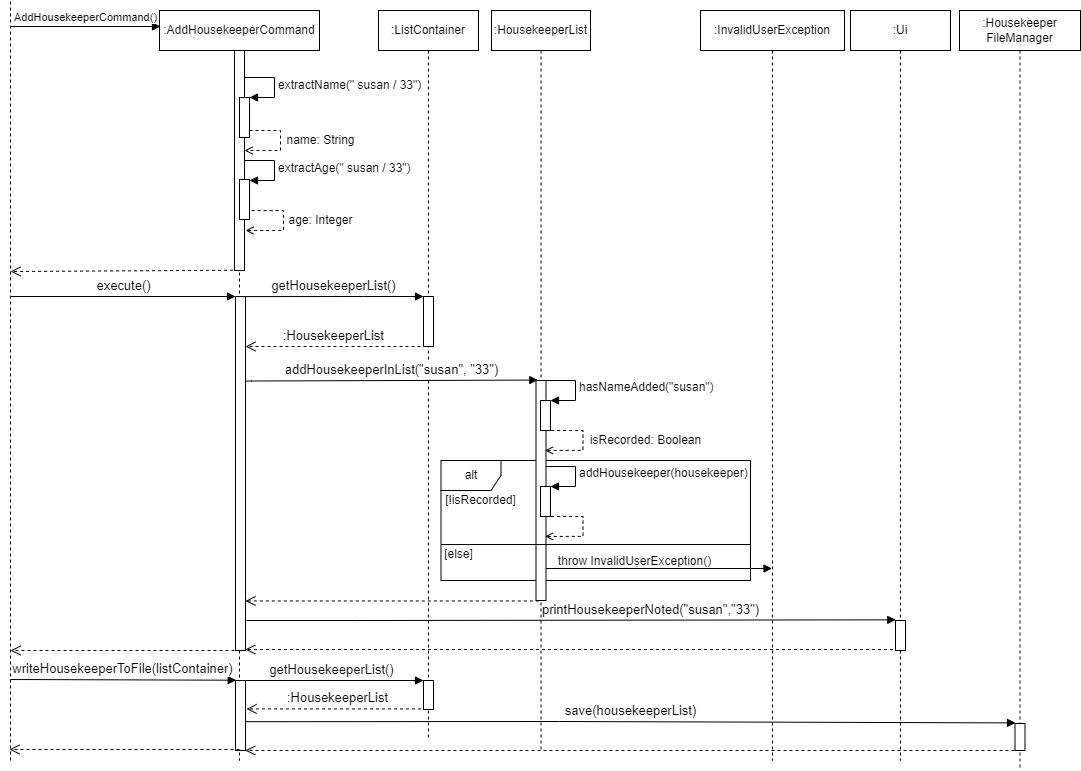
Add Housekeeper Sequence Diagram
PLEASE NOTE: This sequence diagram omits the details of some behavior and classes involved, like the Duke class.
It gives an overview of how the AddHousekeeperCommands runs.
The add housekeeper mechanism is facilitated by AddHousekeeperCommand. It extends command. Additionally,
it implements the following operations:
AddHousekeeperCommand#extractName()— Derive the name of the HousekeeperAddHousekeeperCommand#extractAge()— Derive the age of Housekeeper and cast it into an integerAddHousekeeperCommand#execute()— Executes the addition of new housekeeper into listAddHousekeeperCommand#writeHousekeeperToFile()— Executes the updating of housekeeper list to housekeeper fileHousekeeperList#addHousekeeperInList()— Facilitates the adding of new housekeeper into the listHousekeeperList#hasNameAdded()— Checks if name of housekeeper has been recordedHousekeeperList#addHousekeeper()— Method to add housekeeper into the listUi#printHousekeeperNoted()— Prints a message to show user that housekeeper has been added into the listHousekeeperFileManager#save()— Updates the new housekeeper added into housekeeper file
Given below is an example usage scenario of how AddHousekeeperCommand behaves at each step.
Step 1: User launches the application for the first time. The list of housekeeper in records is empty.
Step 2: User give an add housekeeper command add housekeeper susan / 33. The input will be split by the delimiter
/ to derive susan and 33. The CommandParser runs parse which will return a new AddHousekeeperCommand.
Step 3: AddHousekeeperCommand#extractName()and AddHousekeeperCommand#extractAge() will derive susan and 33.
Step 4: The AddHousekeeperCommand will now contain susan and 33.
Step 5: The execute method will derive the housekeeper name, susan which would first get the list of housekeeper
from ListContainer. It will then call the HousekeeperList#addHousekeeperInList().
Step 6: HousekeeperList#hasNameAdded() will be called to check if housekeeper name has already been recorded in list.
If housekeeper name has been recorded, InavlidUserException() will be thrown.
If housekeeper name has not been recorded HousekeeperList#addHousekeeper() would be called to
add the housekeeper, susan and 33 into the housekeeperList.
Step 7: It will then call Ui#printHousekeeperNoted() to notify user that housekeeper has been added into the list.
Step 8: Since a housekeeper has been added, AddHousekeeperCommand#writeHousekeeperToFile() will be run. It then invoked
HousekeeperFileManager#save() method to save the contents of the housekeeperlist into housekeeper file.
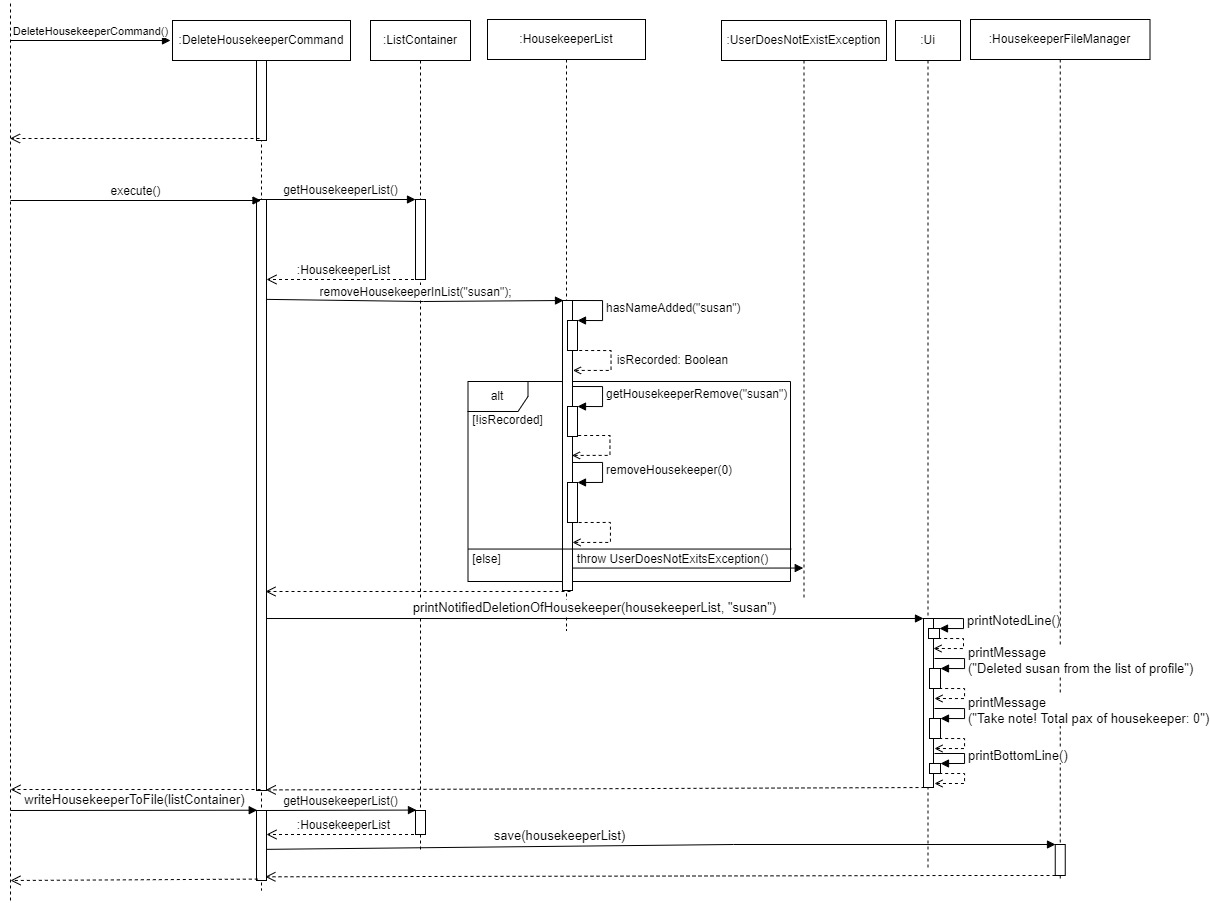
Delete Housekeeper feature
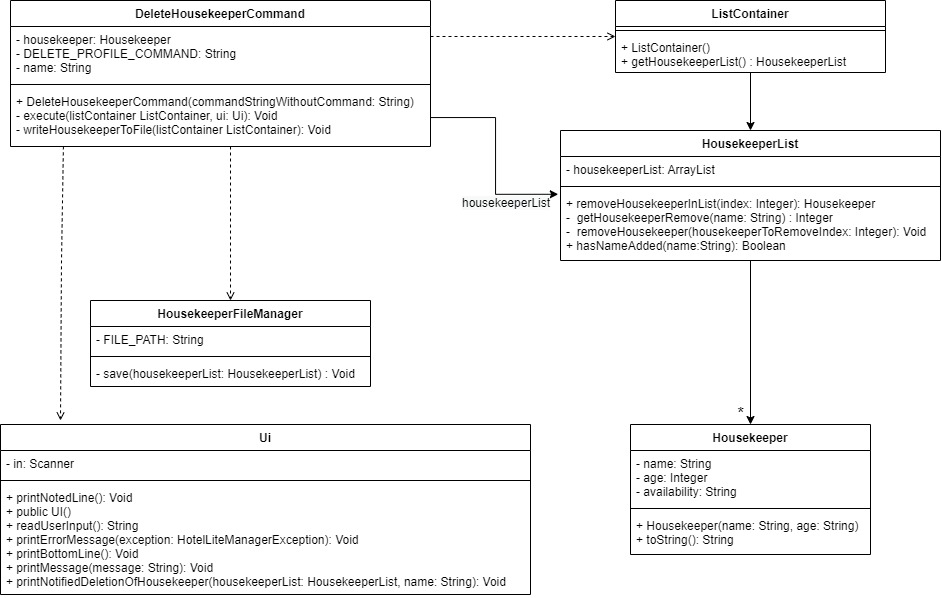
Delete Housekeeper Class Diagram
The objective of the DeleteHousekeeperCommand is to take in the housekeeper’s name to be deleted from the list. The
housekeeper’s profile would be completely removed from records in the housekeeperList. The class diagram below depicts how the DeleteHousekeeperCommand interacts with other classes.
PLEASE NOTE: This class diagram omits the details of some classes involved, like the Duke, CommandParser and Command class.
It also omits unused methods.
Below is an example showing the usage of DeleteHousekeeperCommand.
Step 1: Command given from the user: delete housekeeper susan. This command meant to delete housekeeper called susan.
Step 2: The parse method from CommandParser will run parse to create DeleteHousekeeperCommand and would be return to Duke.
Step 3: The execute method in DeleteHousekeeperCommand will be performed. It would get the housekeeperList from ListContainer.
Step 4: The removeHousekeeperInList method from HousekeeperList would be called to check if the housekeeper’s name
is in the housekeeperList.
Step 5: removeHousekeeperInList will call getHousekeeperRemove method which will derive the index of the housekeeper
recorded in the list. It would return an integer. Assume housekeeper susan is recorded in the list and is in index 0
of the list.
Step 6: With the index given, method removeHousekeeper will be called to remove housekeeper profile from the list.
Step 7: User will then be able to see a message notifying them that the housekeeper susan has been deleted and the total
number of housekeeper currently in working in the hotel.
Step 8: To update the current housekeeperList into housekeeper file, writeHousekeeperToFile method will be call in which
it calls save method from HousekeeperFileManager to reload housekeeper’s information into the housekeeper file.
Delete Housekeeper Sequence Diagram
PLEASE NOTE: This sequence diagram omits the details of some behavior and classes involved, like the Duke class.
It gives an overview of how the DeleteHousekeeperCommand runs.
The add housekeeper mechanism is facilitated by DeleteHousekeeperCommand. It extends command. Additionally, it
implements the following operations:
DeleteHousekeeperCommand#execute()— Executes the addition of new housekeeper into listDeleteHousekeeperCommand#writeHousekeeperToFile()— Update the housekeeper file after deletion of a housekeeperHousekeeperList#hasNameAdded()— Checks if name of housekeeper has been recordedHousekeeperList#removeHousekeeperInlist()— Checks if housekeeper name exist and remove them from the listHousekeeperList#getHousekeeperRemove()— Derive the index of the housekeeper name in the listHousekeeperList#removeHouseekeeper()— Given housekeeper’s index in the list, remove housekeeper from the listUi#printNotifiedDeletionOfHousekeeper()— Prints all information to notify user on total pax of housekeeper left and housekeeper to be deleted has been deletedUi#printNoted()— Prints noted line at the top of messageUi#printBottomLine— Prints bottom line to denote end of messageUi#printMessage()— Used to inform user total pax left in list as well as housekeeper’s profile has already been deleted
Given below is an example usage scenario of how DeleteHousekeeperCommand behaves at each step.
Step 1: User has already added a housekeeper called susan, age 33. Sally is not keen in working as a housekeeper
anymore and resigns. User has to delete the records of susan form housekeeperlist.
Step 2: User gives a delete housekeeper command delete housekeeper susan The input will derive the name parameter of
the delete command which is susan.
Step 3: The DeleteHousekeeperCommand will now contain susan.
Step 4: The execute method will call HousekeeperList#removeHousekeeperInlist(). The remove method in housekeeper list
will then call HousekeeperList#hasNameAdded() where it would use streams to store the housekeeper name which matches
the name for the housekeeper to be deleted. Assuming susan exist, this method will then return true.
Step 5: Since susan is recorded in the list, the program can proceed to delete susan from housekeeperList.
HousekeeperList#getHousekeeperRemove() will be called to derive the index of susan in the housekeeperList.
Assuming susan is in the front of the list, the method will return 0. This index will then be pass to
HousekeeperList#removeHouseekeeper() which removes susan from the list
Step 6: It will then proceed to invoked Ui#printNotifiedDeletionOfHousekeeper() to print noted message to inform user
that the deletion has been completed and the total head count of housekeeper currently working in the hotel
by calling Ui#printNoted(), Ui#printMessage() and Ui#printBottomLine.
Step 7: Changes in the list will be updated to file by calling DeleteHousekeeperCommand#writeHousekeeperToFile() which
invokes theHousekeeperFileManager#save() method.
Item Related Commands
This section showcases how some of the various item related commands such as Add, Search Item Commands are implemented.
Add Item, Delete Item, Update Item Pax, Update Item Name Command
The Add Item, Delete Item, Update Item Pax, Update Item Name Commands have similiar class and sequence diagrams with the exception of some differing methods for each command.
Below is the class diagram showcasing how the class interact with each other when executing the Add Item Command.
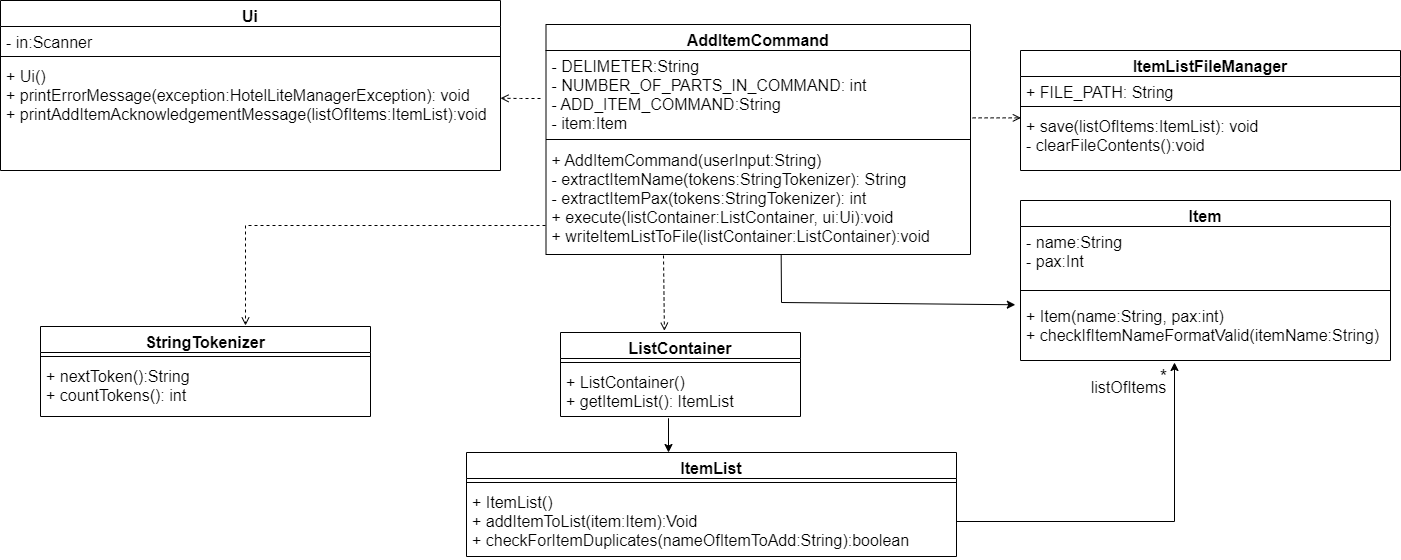 :information_source: Note: : This class diagram omits the details of some classes involved, like the Duke, CommandParser and Command class
Below is the sequence diagram which illustrates the process when an Add Item Command Add Item Toilet Roll is executed.
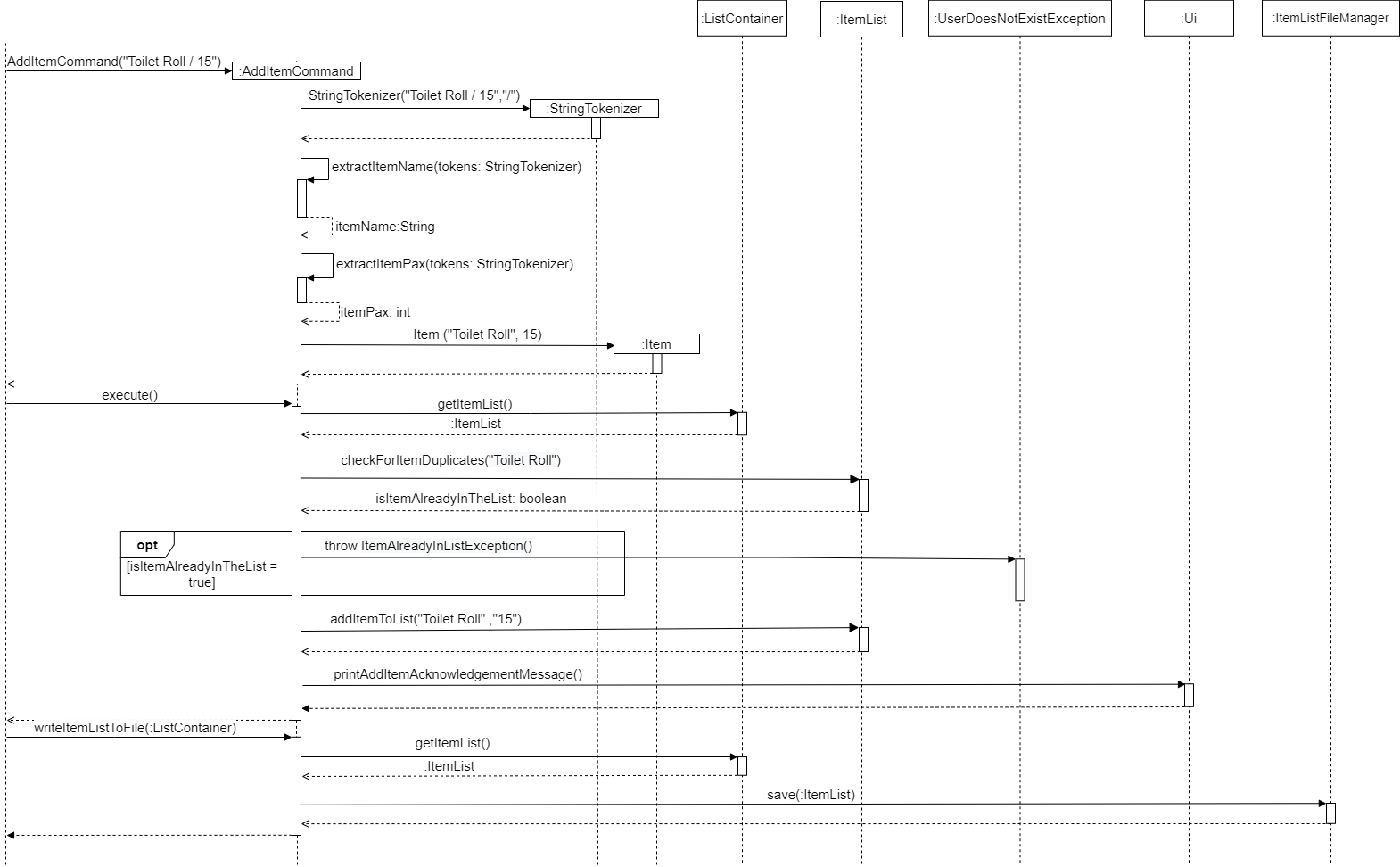
Step 1: The user enters the Add Item Toilet Roll / 15 command to add a new item which is Toilet Roll that has a pax of 15 into the item list. The parse method of CommandParser is called and the user input Add Item Toilet Roll / 15 is passed to it.
Step 2: The parse method would identify the user input as an Add Item Command by searching for the keyword Add Item within the user input. It would then remove Add Item from the user input causing the user input to be just Toilet Roll / 15. The parse method would then call the constructor of AddItemCommand and pass it Toilet Roll / 15.
Step 3: An AddItemCommand object would be created. The constructor of AddItemCommand would call the extractItemPax and extractItemName method of AddItemCommand to extract out 15 and Toilet Roll from the user input respectively. The constructor of Item would then be called and it would create an Item object containing Toilet Roll and 15.
Step 4: The Item object would then be returned to the constructor of AddItemCommand. The Item object would be saved to the AddItemCommand object using the setItem method of AddItemCommand. The AddItemCommand object would be passed back to the parse method of CommandParser.
Step 5: The parse method would then call the execute method of AddItemCommand which would call the getItem method of AddItemCommand to extract out the item object currently saved within the AddItemCommand object.
Step 6: The getName method of item would be called and it would extract the item name of the item object.
Step 7: The checkForItemDuplicates method would then be called and it would check if there are any items within the item list with the same name as the item we are about to add.
Step 8: If there are is an item with a matching name found, we would then throw an ItemAlreadyInListException and the ItemAlreadyInListException would be thrown to the Duke class whereby the printErrorMessage method of the UI class would be called and the exception ItemAlreadyInListException would be passed to it.
Step 9: The printErrorMessage method would then print out a message informing the user that the item to add is already found within the item list. Steps 10 to would then be skipped.
Step 10: If there are no items with a matching name found, we would then add the Item object to the ArrayList of Item objects called listOfItems. The printAddItemAcknowledgementMessage method of UI would be executed. It would then print an acknowledgement message to the user informing him that the item has been added into the item list.
:information_source: Note: As the Add Item, Delete Item, Update Item Pax or Update Item Name Commands have similair class and sequence diagrams, we only require a few changes to be able to use the above class and sequence diagrams to represent the Delete Item, Update Item Pax or Update Item Name Commands. The changes would be mentioned below.
The Delete Item Command is similar to that of the Add Item Command with the difference being:
- The
Delete Itemcommand uses theItem(name:String)constructor instead ofitem(name:String,pax:Int)constructor as theDelete Itemcommand only uses thenamevariable. - The
writeItemListToFilemethod is replaced with thedeleteItemInListmethod and theextractItemName(tokens:StringTokenizer)andextractItemPax(token:StringTokenizer)methods are omitted. - The
addItemToListmethod is replaced with thedeleteItemInListmethod; - The
checkForItemDuplicatesmethod is removed. - The
printAddItemAcknowledgementMessagemethod is replaced with theprintDeleteItemAcknowledgementMessagemethod.
The Update Item Pax Command is similar to that of the Add Item Command with the difference being:
- The
addItemToListmethod is replaced with theupdateItemPaxInListmethod. - The
checkForItemDuplicatesmethod is removed. - The
printAddItemAcknowledgementMessagemethod is replaced with theprintUpdateItemPaxAcknowledgementMessagemethod.
The Update Item Name Command is similar to that of the Add Item Command with the difference being:
- The
extractItemName(tokens)andextractItemPax(tokens)methods are replaced withextractCurrentItemName(tokens)andextractNewItemName(tokens); - The
Item(name:String,pax:Int)constructor is replaced with theItem(oldItemName:String, newItemName:String)constructor; - The
printAddItemAcknowledgementMessagemethod is replaced with theupdateItemNameInListmethod. - The
Update Item Namethrows an extra exception calledDuplicateItemNameExceptionif theoldItemNameis equals to thenewItemName.
Search Item Commands
Below is the class diagram showcasing how the classes interact with each other when executing the Search Item Command.
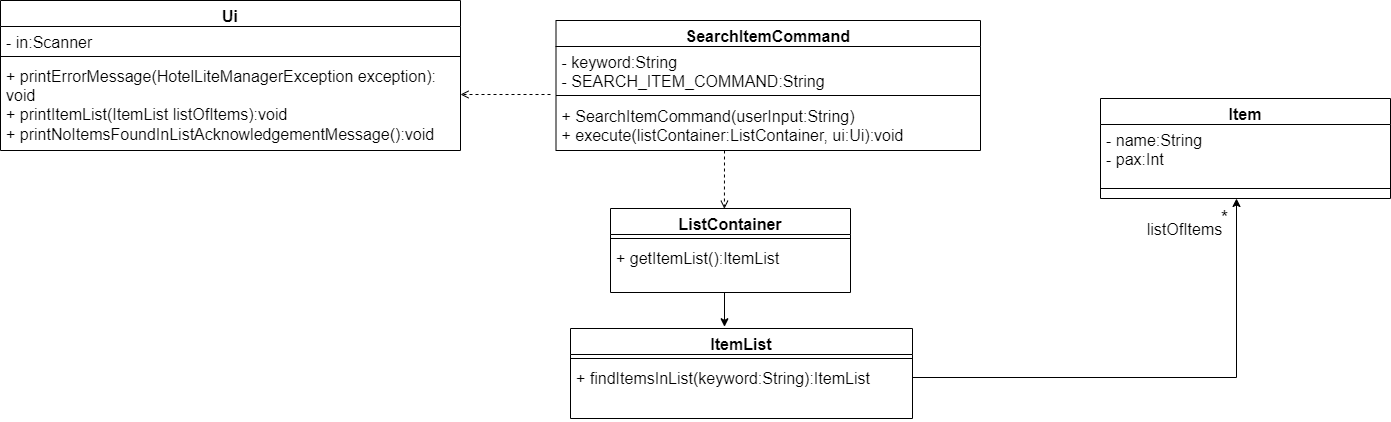 :information_source: Note: : This class diagram omits the details of some classes involved, like the Duke, CommandParser and Command class
Below is the sequence diagram which illustrates the process when an Search Item Command Search Item Toilet Roll is executed.
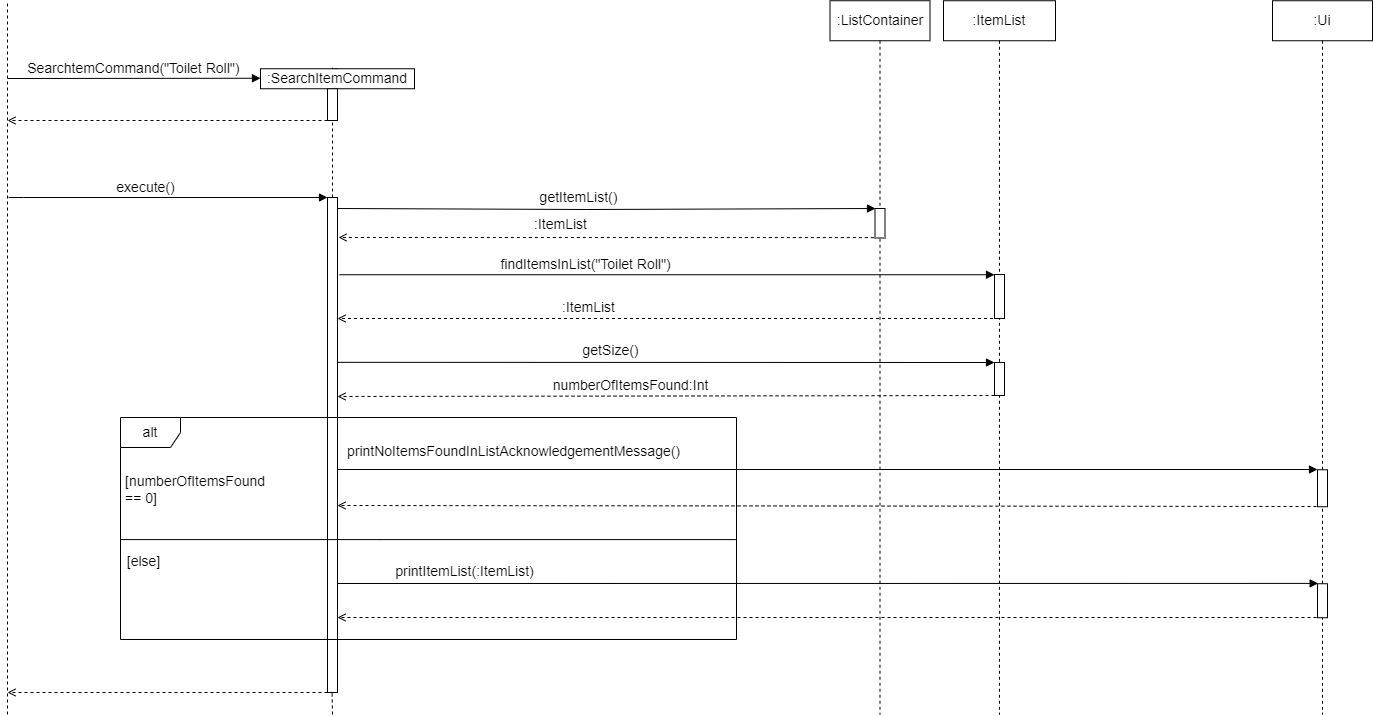 :information_source: Note: : This sequence diagram omits some of the more trivial details such as the getters and setters methods involved.
Step 1: The user enters the Search Item Toilet Roll command to search for an item in the item list whose item name contains the string Toilet Roll. The parse method of CommandParser is called and the user input Search Item Toilet Roll is passed to it.
Step 2: The parse method would identify the user input as a Search Item Command as the user input starts with Search Item. It would then remove Search Item from the user input causing the user input to be just Toilet Roll. The parse method would then call the constructor of SearchItemCommand and pass it Toilet Roll.
Step 3: A SearchItemCommand object would be created and it would contain the keyword Toilet Roll. The SearchItemCommand object would be passed back to the parse method of CommandParser.
Step 5: The parse method would then call the execute method of SearchItemCommand. The execute method would then call the getItemList method of the ListContainer to get the Item List object stored within the ListContainer.
Step 6: The execute method of SearchItemCommand would then call the findItemsInList method of the Item List object which would return an Item List object called listOfMatchingItems to the execute method.
Step 7: The execute method would then call the getSize method of listOfMatchingItems.
Step 8: If the getSize method returns 0 then the execute method would call the printNoItemsFoundInListAcknowledgementMessage method of the UI class which would print a message informing the user that there is no item within the item list whose item name contains their keyword. Step 9 is skipped.
Step 9: If the getSize method returns an integer that is not zero then the execute method would call the printItemList method of the UI class which would print out the item name and pax of those items in the item list whose item name contains the keyword.
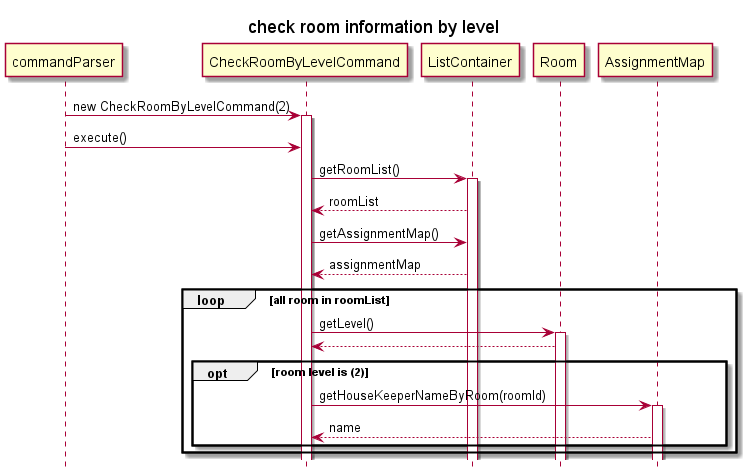
check room information by level
The checking room information by level mechanism is facilitated CheckRoomByLevelCommand. It extends command. Additionally, it implements the following operations:
CheckRoomByLevelCommand#isValidLevel(int level, RoomList roomList)- Checks if the level number is validCheckRoomByLevelCommand#printRoom(int level, RoomList roomlist)- Prints all room information ar target level
Given below is an example usage scenario of how CheckRoomByLevelCommand behaves at each step.
Step 1: The user enters the check level 2 command to check all room information at level 2.
Step 2: The CommandParser runs phase which will return a new CheckRoomByLevelCommand,
and it will parse the parameter after replace command check level to ``.
Step 3: The CheckRoomByLevelCommand will now contain 2.
Step 4: The execute method will call isValidLevel(int level, RoomList roomList) method to check if the level number is valid.
Step 5: The excute method will then call ui.printTableHeader method to print room table header.
Step 6. In the CheckRoomByLevelCommand, it will iterate for roomList and print information of all room at level 2.
Product scope
Target user profile
This application is designed for hotel managers who:
- have a need to manage inventory of items in the hotel
- have a need to store and view the events happening in the hotel
- have a need to view and record the status of rooms (whether they’ve been checked into or checked out of)
- need to keep track of the information related to their housekeeping staff, including their available hours and performance ratings
- like to keep track of customer ratings
- prefer desktop apps over other types
- can type fast
- prefers typing to mouse interactions
- is reasonably comfortable using CLI apps
Value proposition
Hotels can be difficult to manage, as hotel managers must keep track of their employees, their inventory, and the checked-in/checked-out status of their rooms. Thus, this application:
- Allows hotel managers to view and record inventory.
- Allows hotel managers to view and record the status of rooms (whether they’ve been checked into or checked out of).
- Allows hotel managers to manage the information of their housekeeping staff, including their available hours and performance ratings.
- Allows hotel managers to view and record customer satisfaction ratings to gauge their hotel’s performance.
User Stories
| Version | As a … | I want to … | So that I can … |
|---|---|---|---|
| v1.0 | Hotel Manager | Add the items inside the Inventory | record the items that are in the inventory |
| v1.0 | Hotel Manager | Update the items details inside the inventory | ensure the information of items in the inventory are up to date |
| v1.0 | Hotel Manager | View the items inside the inventory along with its paxs | know what are the items currently in the inventory |
| v1.0 | Hotel Manager | View the items inside the inventory with a pax of 0 | quickly identify the items that need to be replenish |
| v1.0 | Hotel Manager | Add housekeeper profile | save a record of current housekeepers |
| v1.0 | Hotel Manager | Add housekeeper availabilities | record the availability of the housekeepers |
| v1.0 | Hotel Manager | View housekeeper availabilities | quickly allocate the shift times to each housekeepers |
| v1.0 | Hotel Manager | Assign housekeeper to a room | keep a record of which housekeeper is currently assigned to which room |
| v1.0 | Hotel Manager | View where the housekeeper is assigned to | ensure that there is a maximum of 2 housekeepers assigned to each floor |
| v1.0 | Hotel Manager | Update room vacancy status | keep a record of which rooms are currently occupied |
| v1.0 | Hotel Manager | View room vacancy status | identify how many rooms are vacant per floor inorder to determine how many housekeeper will be assigned to each floor |
| v1.0 | Hotel Manager | View number of vacant rooms per category | quickly determine if the type of room a guest wants is available |
| v1.0 | Hotel Manager | View housekeeper profile | know who are the current housekeepers as well as the total number of housekeepers to prevent over-hiring |
| v1.0 | Hotel Manager | Add housekeeper performance | save a record of each housekeepers performance |
| v1.0 | Hotel Manager | Add housekeeper performance | save a record of each housekeepers performance |
| v1.0 | Hotel Manager | View housekeeper performance | know who are the under-performing employees |
| v1.0 | Hotel Manager | Add each customer satisfaction | record the average satisfaction level of the customers |
| v1.0 | Hotel Manager | View overall customer satisfaction | ensure that the customers are satisfied and improve hotel’s service accordingly |
| v2.0 | Hotel Manager | Add events happening | keep track of events happening in the hotel |
| v2.0 | Hotel Manager | View the list of all events | know which events are happening where |
| v2.0 | Hotel Manager | Delete an event | update the list of events as circumstances change |
| v2.0 | Hotel Manager | Update every housekeeper age when a new year begins | easily determine which housekeeper is over the age limit and have an updated age list of the housekeeper |
| v2.0 | Hotel Manager | Delete housekeeper’s profile from list | keep track of active Housekeepers |
| v2.0 | Hotel Manager | Reset the availability of housekeeper | re-enter every housekeeper’s available at the start of each week |
| v2.0 | Hotel Manager | View housekeepers available from Monday to Sunday | determine which days have no available housekeeper |
| v2.0 | Hotel Manager | Search for the items inside the item list using a keyword | quickly find the items I want in the item list quickly and easily without having to scroll through the entire item list |
| v2.0 | Hotel Manager | View overall customer satisfaction | ensure that the customers are satisfied and improve hotel’s service accordingly |
| v2.0 | Hotel Manager | View housekeeper performance | know who are the under-performing employees |
Non-Functional Requirements
- Most operating systems, including Windows, Linux, OS-X, and Unix, should be able to run the program.
- Program should work with Java
11or above installed. - This program can support:
- Maximum of
1millionitem pax can be recorded into file. - Maximum of
1000customer’s satisfaction in list without experiencing any slowness. - Maximum of
1000items in list without experiencing any slowness. - Maximum of
1000housekeeper’s profiles in list without experiencing any slowness. - Maximum of
1000event’s details in list without experiencing any slowness.
- Maximum of
Instructions for manual testing
The instructions below provide a quick summary of how to manually test the functions.
- Set up and Launching the program
- Ending the Program
- Satisfaction Related Functions
- Housekeeper Related Functions
- Room Related Functions
- Item Related Functions
- Event Related Functions
Set up and Launching the program
- Download the JAR file
- Open command terminal and go to the directory that stores the JAR file
- Run the application by typing:
java -jar NameOfFile. NameOfFile represents the JAR file name
Ending the Program
- To end the program, type
bye.
Satisfaction Related Functions
| Test Case | Command | Expected Result |
|---|---|---|
| Add 1 Satisfaction. | add satisfaction Bob / 5 |
Adds a Satisfaction object representing customer Bob with rating 5 |
| Add Satisfaction corresponding to customer whose satisfaction has already been recorded. | add satisfaction Bob / 5 |
Error message to user |
| Missing customer name. | add Satisfaction / 5 |
Error message to user |
| Missing rating. | add satisfaction Bob / |
Error message to user |
| Customer name contains non-alphabetic (excluding space) characters. | add satisfaction Bob123 / 5 |
Error message to user |
| Rating is out of range of 1-5, inclusive. | add satisfaction Bob / -1 |
Error message to user |
| View recorded satisfactions. | view satifactions |
Lists out all satisfactions that user has recorded so far |
| Add extra characters to view recorded satisfactions command. | view satisfactions blah blah |
Error message to user |
| View average satisfaction. | view average satisfaction |
Reports the average customer satisfaction |
| Add extra characters to view average satisfaction. | view average satisfaction blah blah |
Error message to user |
Housekeeper Related Functions
Housekeeper functions
- Assume that the
HousekeeperListhas aHousekeepernamedSteveand aHousekeepernamedFred. - Assume
Steveis24years old and is available onMonday. - Assume
Fredis30years old and is available onMondayandWednesday.
| Test Case | Command | Expected Result |
|---|---|---|
| Add 1 housekeeper. | add housekeeper mary / 33 |
Adds housekeeper name mary and is 33 years old |
| Add empty name and empty age. | add housekeeper / |
Error message to user |
| Add existing housekeeper. | add housekeeper steve / 33 |
Error message to user |
Add availability to Steve. |
availability Steve/1,3 |
Adds steve availability to Monday and Wednesday |
| Add availability is not between 1 and 7. | availability Steve/1,3,10 |
Error message to user |
| View recorded housekeepers in the list. | ```view recorded housekeepers`` | Lists out all housekeeper profiles that user has recorded so far |
Delete housekeeper Fred. |
delete housekeeper Fred |
Fred has been deleted from the list |
| Delete housekeeper not in list. | delete housekeeper Manny |
Error message to user |
| Get Housekeeper available on Monday. | get available on 1 |
Shows Fred and Steve being available to work on Monday |
| Get Housekeeper available on not valid day. | get available on 18 |
Error message to user |
| Reset availability of all housekeepers. | is a new week |
All housekeeper availabilities in the list will now show N/A |
| Increase all age of housekeeper by one. | is a new year |
All housekeeper age increase by one. Fred age : 31 Steve age : 25 |
Housekeeper Performance functions
- Prerequisite: For
HousekeeperPerformance-related commands, the theHousekeeperListmust contain all the housekeepers that the user wants to record performances for. - Assume that the
HousekeeperListhas aHousekeepernamedSteveand aHousekeepernamedFred.
| Test Case | Command | Expected Result |
|---|---|---|
Add 1 housekeeper performance for Steve |
add performance Steve / 3. |
Adds performance rating of 3 for housekeeper Steve |
Add 1 housekeeper performance for Joe, who is not in the HousekeeperList. |
add performance Joe / 3 |
Error message to user |
Add 1 housekeeper performance for Fred with rating that is not within range of 1-5, inclusive. |
add performance Fred / -1 |
Error message to user |
| View recorded housekeeper performances | view performances |
Lists out all housekeeper performances that user has recorded so far |
| Add extra characters to view recorded housekeeper performances | view performances blah blah |
Error message to user |
Assignment of Housekeeper function
- The format of the command is
assign NAME / ROOMID. - Prerequisites:
- the housekeeper with this
NAMEshould already exist in the system. - the room with this
ROOMIDshould already exist in the system.
- the housekeeper with this
| Test Case | Command | Expected Result |
|---|---|---|
Assign Susan to room 301 |
assign susan / 301 |
Registers the assignment |
| Assign housekeeper that does not exist | assign james / 301 |
Error message to the user |
Add susan to invalid room |
assign susan / 90 |
Error message to the user |
Add susan to non-integer room id |
assign susan / ioduf |
Error message to the user |
| Fail to separate fields | assign susan 301 |
Error message to the user |
Room Related Functions
| Test Case | Command | Expected Result |
|---|---|---|
Check in room 201 |
check in 201 |
Change Status of room 201 from Vacant to Occupied |
Check in room 501, which is not in the RoomList |
check in 501 |
Error message to user |
Check all room of double type |
check category double |
Lists out all room of double category |
Check all room of president type, which is not valid in RoomList |
check category president |
Error message to user |
Check all room in level 3 |
check level 3 |
Lists out all room in level 3 |
Check all room in level 5, which is not within the level range of 1-4 |
check level 5 |
Error message to user |
Item Related Functions
| Test Case | Command | Expected Result |
|---|---|---|
| Add the Toilet Paper with 15 Pax into the item list | add item Toilet Paper / 15 |
The item Toilet Paper with a pax of 15 gets added into the item list. |
| Add the Item Toilet Paper with a Pax of 2000000 which is over the pax limit into the item list. | add item Toilet Paper / 2000000 |
The invalid item pax error message gets displayed to the user. |
| Update the item name of toilet paper within the item list from 2 ply toilet paper to 5 ply toilet paper. | update item Name 2 ply toilet paper / 5 ply toilet paper |
The name of the item 2 ply toilet paper gets updated to 5 ply toilet paper. |
| Update the item name of toilet paper within the item list from 2 ply toilet paper to 2 ply toilet paper. | update item Name 2 ply toilet paper / 2 ply toilet paper |
An error message would be shown to the user informing him/her that the item names cannot be the same. |
| Update the pax of the table item to go from its current pax value to 20. | update item Pax Table / 20 |
The item Table would have an updated pax of 20. |
| Given that the current pax of the table item is 50, update its pax to 50. | update item Pax Table / 50 |
An error message would be shown to the user informing him/her that the new item pax cannot be the same as the current pax. |
| Search for items within the item list using the keyword toilet. | search item Toilet |
All the items within the item list whose item name contains toilet would be displayed in a list format to the user along with their pax. |
| Search for items within the item list without providing any keyword. | search item |
An error message would be shown to the user informing him/her that the keyword cannot be empty. |
| Delete the item called Tooth Brush within the item list. | delete item Tooth Brush |
The Tooth Brush item would be deleted from the item list. |
| Delete a non-existent item within the item list. | delete item Gold Bars |
An error message would be shown to the user informing him/her that the item cannot be found in the item list. |
| View all items within the item list. | view all items |
All the items within the item list would be displayed to the user in a list format. |
| Enter an invalid view all items command. | view all items again |
An error message would be shown to the user informing the user that he/she have entered the view all items command in the wrong format. The error message also shows the correct format. |
| View all items within the item list with a pax of zero. | view items with zero pax |
All the items with a pax of zero within the item list would be displayed to the user in a list format |
| Enter an invalid view all items with zero pax command. | view items with zero pax abc abc |
An error message would be shown to the user informing the user that he/she have entered the view items with zero pax command in the wrong format. The error message also shows the correct format. |
Event Related Functions
Add Event
- The format of the command is
add event DESCRIPTION / DATE. - Prerequisites:
- date should be in
yyyy-mm-ddformat. - the description should only contain alphanumeric characters.
- the event should not already exist in the system.
- date should be in
| Test Case | Command | Expected Result |
|---|---|---|
Add event study on 19 Nov 2022 |
add event study / 2022-11-19 |
Adds the event |
Add event study with no date |
add event study |
Error message to the user |
Add event st*&udy |
add event st*&udy / 2022-11-21 |
Error message to the user |
| Add duplicate event | add event study / 2022-11-19 |
Error message to the user |
| Add extra fields to the command | add event submit TP / 2022-04-11 / blah |
Error message to the user |
| Fail to separate fields | add event submit TP 2022-04-11 |
Error message to the user |
Delete Event
- The format of the command is
delete event INDEX. - Prerequisites:
- index should be an integer.
- the event should exist in the system.
| Test Case | Command | Expected Result |
|---|---|---|
Delete event study from the list |
delete event 1 |
Deletes the event |
| Delete event with index out of bounds | delete event 6 |
Error message to the user |
| Delete event with non-integer index | delete event sf |
Error message to the user |
| Delete event with no index | delete event |
Error message to the user |